Understanding Findings
Findings are security issues discovered during scans. The findings workflow lets you triage, track, and resolve vulnerabilities across all your repositories.
Findings List
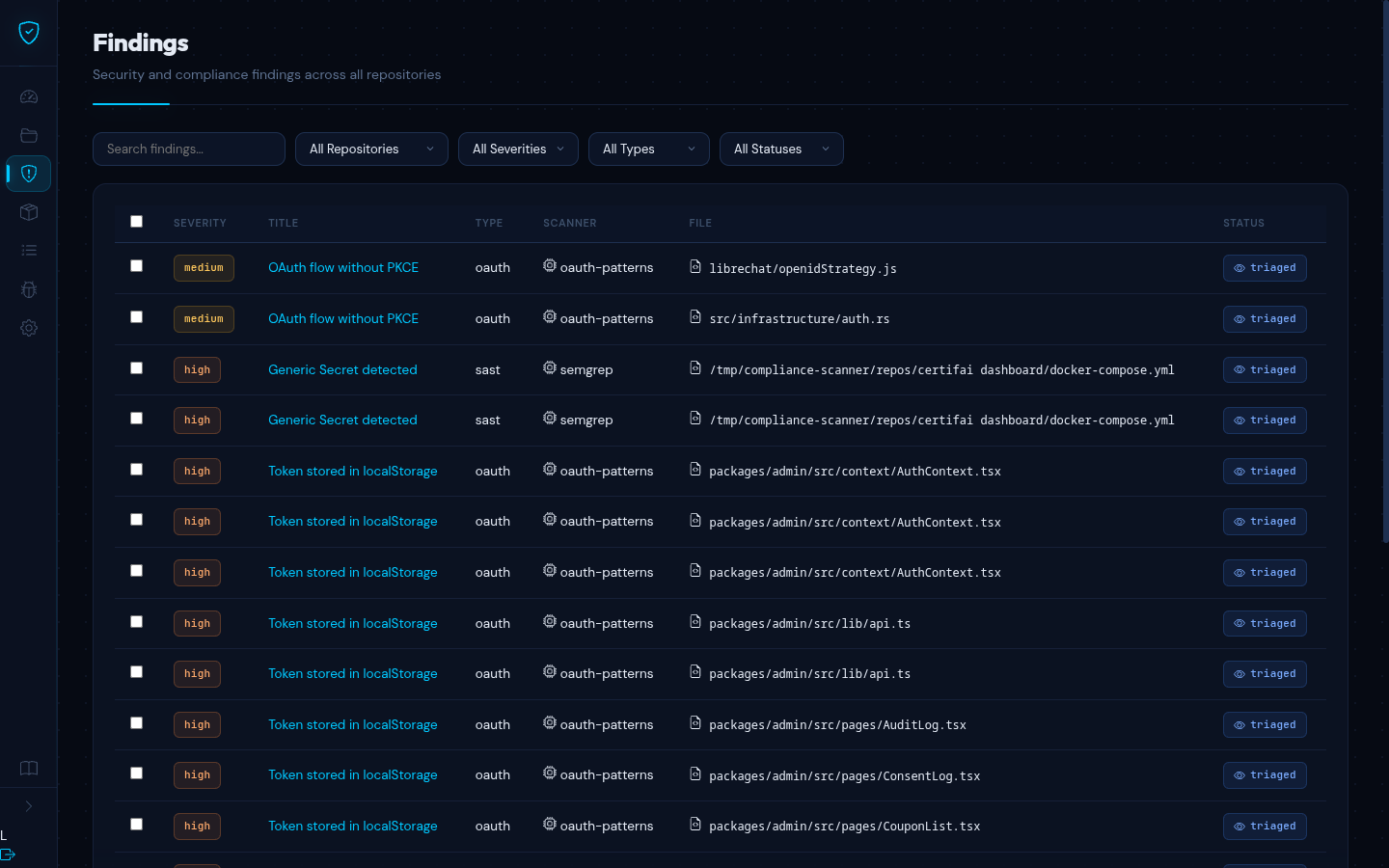
Navigate to Findings in the sidebar to see all findings across your repositories.
Filtering
Use the filter bar to narrow results:
- Repository -- filter to a specific repository or view all
- Severity -- Critical, High, Medium, Low, or Info
- Type -- SAST, SBOM, CVE, GDPR, OAuth, Secrets, Code Review
- Status -- Open, Triaged, Resolved, False Positive, Ignored
Filters can be combined. Results are paginated with 20 findings per page.
Columns
| Column | Description |
|---|---|
| Severity | Color-coded badge: Critical (red), High (orange), Medium (yellow), Low (green), Info (blue) |
| Title | Short description of the vulnerability (clickable) |
| Type | SAST, SBOM, CVE, GDPR, OAuth, Secrets, or Code Review |
| Scanner | Tool that found the issue (e.g. Semgrep, Grype) |
| File | Source file path where the issue was found |
| Status | Current triage status |
Finding Detail
Click any finding title to view its full detail page.
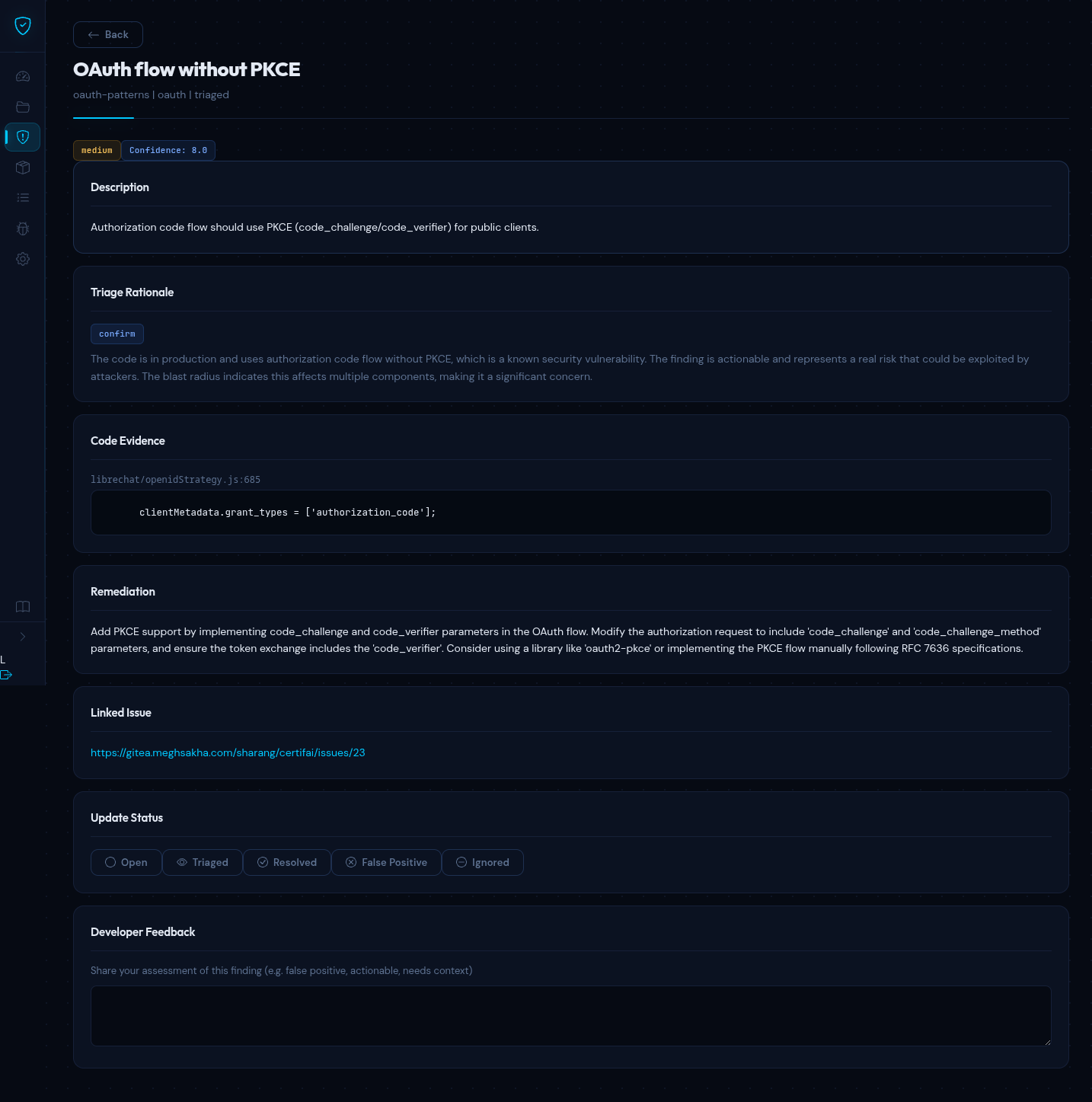
The detail page is organized into these sections:
Description
A full explanation of the vulnerability: what it is, why it is a risk, and what conditions trigger it.
AI Triage Rationale
The LLM's assessment of the finding, including why it assigned a particular severity and confidence score. This rationale considers the code context, the type of vulnerability, and the blast radius based on the code knowledge graph.
Code Evidence
The source code snippet where the issue was found, with syntax highlighting and the file path with line number.
Remediation
Step-by-step guidance on how to fix the vulnerability, often including a suggested code fix showing the corrected implementation.
Linked Issue
If the finding has been pushed to an issue tracker (GitHub, GitLab, Gitea, Jira), a direct link to the external issue appears here.
Severity Levels
| Severity | Description | Typical Examples |
|---|---|---|
| Critical | Immediate exploitation risk, data breach likely | SQL injection, RCE, hardcoded secrets |
| High | Serious vulnerability, exploitation probable | XSS, authentication bypass, SSRF |
| Medium | Moderate risk, exploitation requires specific conditions | Insecure deserialization, weak crypto |
| Low | Minor risk, limited impact | Information disclosure, verbose errors |
| Info | Informational, no direct security impact | Best practice recommendations |
Finding Types
| Type | Source | Description |
|---|---|---|
| SAST | Semgrep | Code-level vulnerabilities found through static analysis |
| SBOM | Syft + Grype | Vulnerable dependencies identified in your software bill of materials |
| CVE | NVD | Known CVEs matching your dependency versions |
| GDPR | Custom rules | Personal data handling and consent issues |
| OAuth | Custom rules | OAuth/OIDC misconfigurations and insecure token handling |
| Secrets | Custom rules | Hardcoded credentials, API keys, and tokens |
| Code Review | LLM | Architecture and security patterns reviewed by the AI engine |
Triage Workflow
Every finding follows a lifecycle from discovery to resolution. The status indicates where a finding is in this process:
| Status | Meaning |
|---|---|
| Open | Newly discovered, not yet reviewed |
| Triaged | Reviewed and confirmed as a real issue, pending fix |
| Resolved | A fix has been applied |
| False Positive | Not a real vulnerability in this context |
| Ignored | Known issue that will not be fixed (accepted risk) |
On the finding detail page, use the status buttons to move a finding through this workflow. Status changes take effect immediately.
Recommended Flow
- A scan discovers a new finding -- it starts as Open
- You review the AI triage rationale and code evidence
- If it is a real issue, mark it as Triaged to signal that it needs a fix
- Once the fix is deployed and a new scan confirms it, mark it as Resolved
- If the AI got it wrong, mark it as False Positive (see below)
False Positives
Not every finding is a real vulnerability. Static analysis tools can flag code that looks suspicious but is actually safe in context. When this happens:
- Open the finding detail page
- Review the code evidence and the AI triage rationale
- If you determine the finding is not a real issue, click False Positive
TIP
When you mark a finding as a false positive, you are providing training signal to the AI. Over time, the LLM learns from your feedback and becomes better at distinguishing real vulnerabilities from false alarms in your codebase.
Human in the Loop
Certifai uses AI to triage findings, but humans make the final decisions. Here is how the process works:
- AI triages -- the LLM reviews each finding, assigns a severity, generates a confidence score, and writes a rationale explaining its assessment
- You review -- you read the AI's analysis alongside the code evidence and decide whether to act on it
- You decide -- you set the final status (Triaged, Resolved, False Positive, or Ignored)
- AI learns -- your feedback on false positives and status changes helps improve future triage accuracy
The AI provides the analysis; you provide the judgment. This approach gives you the speed of automated scanning with the accuracy of human review.
Developer Feedback
On the finding detail page, you can provide feedback on the AI's triage. This feedback loop serves two purposes:
- Accuracy -- helps the platform understand which findings are actionable in your specific codebase and context
- Context -- lets you add notes explaining why a finding is or is not relevant, which benefits other team members reviewing the same finding
Confidence Scores
Each AI-triaged finding includes a confidence score from 0.0 to 1.0, indicating how certain the LLM is about its assessment:
- 0.8 -- 1.0 -- High confidence. The AI is very certain this is (or is not) a real vulnerability.
- 0.5 -- 0.8 -- Moderate confidence. The finding likely warrants human review.
- Below 0.5 -- Low confidence. The AI is uncertain and recommends manual inspection.
Use confidence scores to prioritize your review queue: start with high-severity, high-confidence findings for the greatest impact.