MCP Integration
Certifai exposes your security data through the Model Context Protocol (MCP), allowing LLM-powered tools to query your findings, SBOM data, and DAST results directly.
What is MCP?
The Model Context Protocol is an open standard that lets AI tools (like Claude, Cursor, or custom agents) connect to external data sources. Think of it as a way for your LLM to "see" your security data without you having to copy and paste it.
When an MCP client is connected to Certifai, you can ask questions like "Show me all critical findings" or "What vulnerable packages does this repo have?" and the LLM will query Certifai directly to get the answer.
Why It Matters
Without MCP, getting security data into an LLM conversation requires manual effort -- exporting reports, copying findings, pasting context. With MCP:
- Your AI coding assistant can check for security issues as you write code
- You can ask natural language questions about your security posture
- Security data stays up to date because it is queried live, not exported statically
- Multiple team members can connect their own LLM tools to the same data
Managing MCP Servers
Navigate to MCP Servers in the sidebar to manage your MCP server instances.
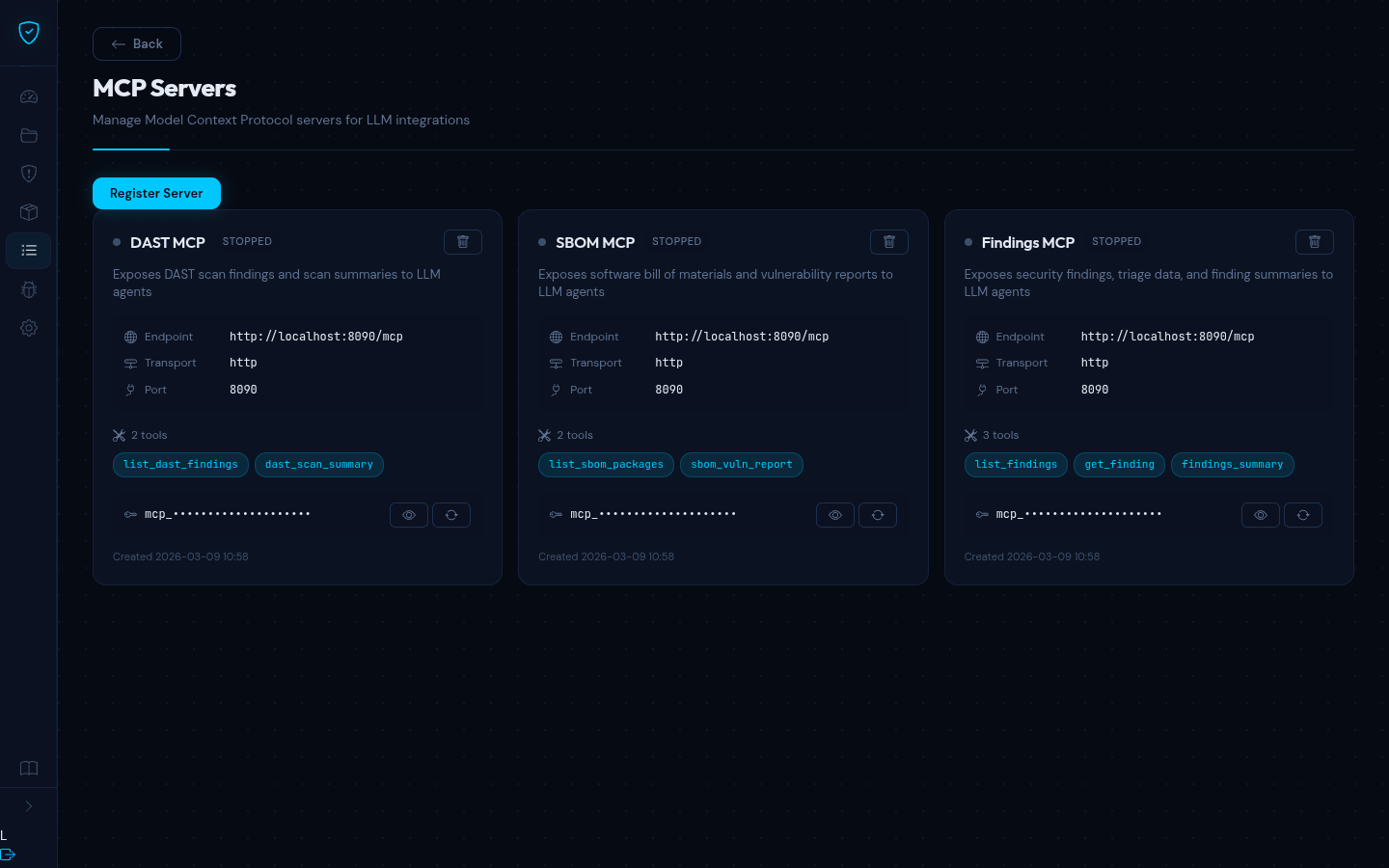
From this page you can:
- Register new MCP server instances with their endpoint URL, transport type, and port
- View server configuration, enabled tools, and status
- Manage access tokens -- reveal, copy, or regenerate bearer tokens for authentication
- Delete servers that are no longer needed
Each registered server is assigned a random access token on creation. You use this token in your MCP client configuration for authenticated access.
Available Tools
The MCP server exposes seven tools that LLM clients can discover and call:
Findings Tools
| Tool | Description |
|---|---|
list_findings | Query findings with optional filters for repository, severity, status, and scan type. Returns up to 200 results. |
get_finding | Retrieve a single finding by its ID. |
findings_summary | Get finding counts grouped by severity and status, optionally filtered by repository. |
SBOM Tools
| Tool | Description |
|---|---|
list_sbom_packages | List SBOM packages with filters for repository, vulnerabilities, package manager, and license. |
sbom_vuln_report | Generate a vulnerability report for a repository showing all packages with known CVEs. |
DAST Tools
| Tool | Description |
|---|---|
list_dast_findings | Query DAST findings with filters for target, scan run, severity, exploitability, and vulnerability type. |
dast_scan_summary | Get a summary of recent DAST scan runs and finding counts. |
Connecting an MCP Client
To connect an MCP-compatible tool (like Claude Desktop or Cursor) to your Certifai MCP server:
- Go to MCP Servers in Certifai and note the server endpoint URL and access token
- In your MCP client, add a new server connection with:
- URL -- the MCP server endpoint (e.g.
https://your-certifai-instance/mcp) - Transport -- Streamable HTTP
- Authentication -- Bearer token using the access token from Certifai
- URL -- the MCP server endpoint (e.g.
Once connected, the LLM client automatically discovers the available tools and can call them in response to your questions.
TIP
The MCP server is read-only -- it only queries data. It cannot modify findings, trigger scans, or change configuration. This makes it safe to expose to LLM clients.
Example Queries
Once your MCP client is connected, you can ask questions like:
- "Show me all critical findings across my repositories"
- "What vulnerable packages does the backend service have?"
- "Give me a summary of DAST findings for the staging target"
- "How many open findings do we have by severity?"
The LLM translates your natural language question into the appropriate tool call and presents the results in a readable format.